YAML in · comics out
Draw comics by describing them
ComicForge is a tiny, scriptable comic-page engine. A character is a base SVG plus stackable overlays — faces, arms, poses. A page is a declarative YAML spec. The output is SVG, PNG or PDF, vector all the way down and rasterized only at the very end.
There is no timeline, no canvas, no mouse. You say who is in the panel, where they stand, and what they say — and the engine draws it, the same way every time. Which means a script can write your comic, and so can a language model.
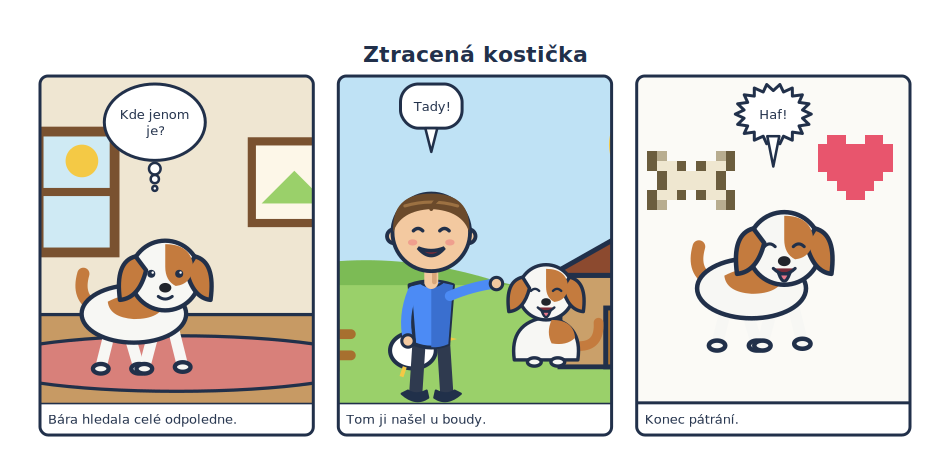
That strip is not a screenshot. It is rendered from this file, every time these docs are built:
title: "Ztracená kostička"
title_style: {font_size: 22, color: "#21304a"}
page: [190, 95]              # a custom [width_mm, height_mm] — or A4 / A5 / letter
px_per_mm: 5
margin_mm: 8
gutter_mm: 5
library:    "../../examples/pes/characters"
scenes_dir: "../../examples/pes/scenes"
pixel_dir:  "../../examples/pes/pixel"
frame: {width: 3, radius: 8}
bubble_style: {font_size: 13, em: 0.95}

rows:
  - panels:
      - scene: pokoj
        caption: "Bára hledala celé odpoledne."
        actors:
          - {char: bara, pose: walk, face: neutral, x: 0.42, y: 0.68, scale: 0.48}
        bubbles:
          - {text: "Kde jenom je?", kind: thought, speaker: bara, max_chars: 12}

      - scene: {name: dvur, weather: clear}
        caption: "Tom ji našel u boudy."
        actors:
          - {char: tom,  face: happy, arms: point, x: 0.34, y: 0.64, scale: 0.76}
          - {char: bara, pose: sit, face: happy,   x: 0.76, y: 0.70, scale: 0.38}
        bubbles:
          - {text: "Tady!", kind: speech, speaker: tom}

      - caption: "Konec pátrání."
        actors:
          - {char: bara, pose: walk, face: happy, x: 0.5, y: 0.6, scale: 0.5}
        pixel:
          - {art: heart, x: 0.8, y: 0.28, scale: 0.2}
          - {art: bone,  x: 0.2, y: 0.32, scale: 0.18}
        bubbles:
          - {text: "Haf!", kind: shout, speaker: bara}
Why it is built this way
-
A page is data
The entire authoring surface is YAML and a JSON manifest of what art exists. No API to learn, nothing imperative to sequence. Diff it, template it, generate it, review it in a pull request.
-
Posing is stacking
No rig, no bones, no interpolation. An expression is a small SVG drawn in the same canvas as the body; choosing one is choosing a filename. You can open any of them in an editor and fix a line by hand.
-
Vector to the last step
Everything composes as SVG and rasterizes once, at the end. A PDF stays crisp at print size; a PNG comes out at whatever
px_per_mmyou ask for. -
The engine ships no art
comicforge/contains code and nothing else — no default characters, no bundled sprites. Your project owns every asset it draws, so the engine is a dependency rather than a content bundle.
In sixty seconds
uv tool install comicforge     # puts `cmf` on your PATH — no venv, no Python project
cmf init my-comic              # scaffold characters/ scenes/ pixel/ pages/
cd my-comic
cmf render pages/hello.yaml    # -> output/hello-<timestamp>.png
Then open pages/hello.yaml, change a line, render again. That is the whole
loop. Your first comic walks through it properly.
What a spec can hold
-
Actors — characters placed by panel fraction, with a pose and a variant per slot.
-
Bubbles — speech, thought and shout, word-wrapped, auto-placed over whoever is speaking.
-
Scenes — reusable illustrated backgrounds with their own overlay slots, cover-scaled into any panel.
-
Captions and frames — narration bands and panel outlines, page-wide or per panel.
-
Pixel art — sprites as a grid of characters and a palette, from a file or inline.
-
Raster images — drop a finished bitmap in as a panel background and compose on top of it.
Where to go next
| If you want to… | Read |
|---|---|
| Get something on screen | Your first comic |
| Set up a real project | Starting a project |
| Understand the model | Core concepts |
| Look up a key | Spec reference |
| Look up a command | CLI reference |
| Draw your own characters | Making the art |
| Have Claude write specs | With Claude |
| See it all working | Gallery |