Raster images
When the art for a panel is a finished bitmap — a photograph, a painting, a
generated image — point the panel at it with image: instead of building a
scene: out of SVG. Everything else works unchanged: sprites, actors and
bubbles compose on top.
image: "art/panel-01.png"                     # short form, fit: cover
image: {src: "art/panel-01.png", fit: contain} # long form
image: {src: "art/panel-01.png", at: t, crop: {bottom: 120}}
The path resolves against the spec file's directory, like every other relative path in a spec.
Fitting
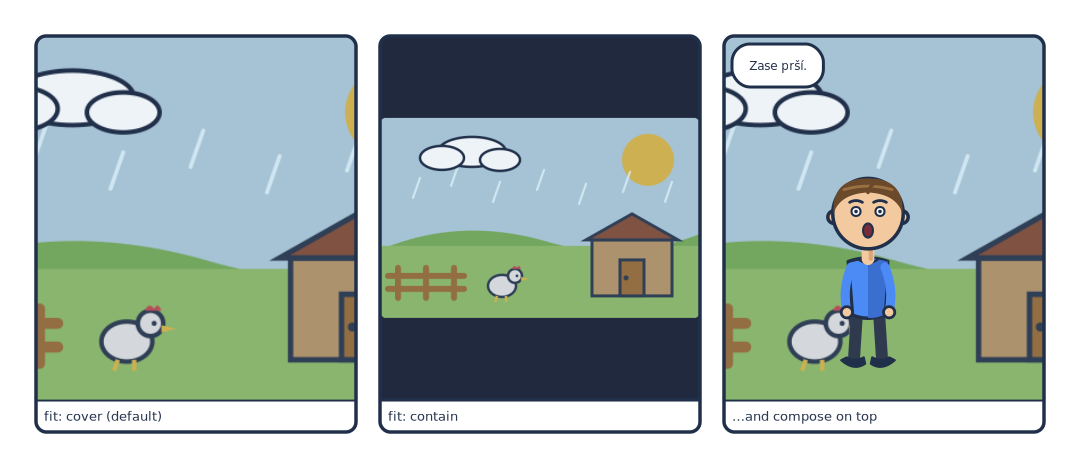
# A raster panel background. `fit: cover` (the default) fills the panel and
# crops; `fit: contain` fits the whole image and shows `bg:` in the strips.
page: [180, 78]
px_per_mm: 6
margin_mm: 6
gutter_mm: 4
library: "../../examples/pes/characters"
bubble_style: {font_size: 12}

rows:
  - panels:
      - caption: "fit: cover (default)"
        image: "raster-art/backdrop.png"

      - caption: "fit: contain"
        bg: "#20293d"
        image: {src: "raster-art/backdrop.png", fit: contain}

      - caption: "…and compose on top"
        image: "raster-art/backdrop.png"
        actors:
          - {char: tom, face: surprised, x: 0.45, y: 0.62, scale: 0.62}
        bubbles:
          - {text: "Zase prší.", kind: speech, at: tl, max_chars: 12}
fit |
Behaviour |
|---|---|
cover (default) |
Scale to fill the panel, centre-crop the overflow — the same rule a vector scene follows |
contain |
Scale to fit inside the panel; the leftover strips show the panel's bg: |
cover crops rather than distorts, so a 16:10 image in a 4:3 panel loses its
sides. contain never crops, which makes it the right choice when the image has
something at its edges you cannot lose — and the reason to set a deliberate
bg: alongside it.
Supported types: .png, .jpg / .jpeg, .gif, .webp.
Cropping and anchoring
Two keys decide which part of the picture survives:
| Key | Behaviour |
|---|---|
crop: {top, bottom, left, right} |
Trim that many image pixels off each edge before fitting. Omitted sides are 0 |
at |
Pin the image to an edge or corner — t, b, l, r, tl, tr, bl, br, c — the same names a bubble's at: uses. Default: centred |
image: {src: "art/05.png", crop: {top: 80, bottom: 40}}  # lose the empty sky
image: {src: "art/06.png", at: b}                        # crop the top, keep the feet
crop: is exact and changes the picture's shape: fit, a standalone scene's
canvas and a height: auto row all
see the trimmed image. at: changes nothing about the size; it only moves
where fit: cover takes its overflow from (and, with fit: contain, which side
the letterbox strips go on). Generated art often has room to spare at the top
or bottom — trim it with crop: and let at: handle whatever the page still
has to squeeze.
Images are embedded, not linked
The bitmap goes into the output as a base64 data: URI. An .svg or .pdf
render is therefore one self-contained file that still works when it is moved,
copied or mailed — nothing to keep beside it.
That weight is real
The output carries the full bytes of every image on the page. A page of full-resolution photographic panels produces a very large SVG or PDF. Downsample the sources to roughly the size they will be printed at before you build the final page.
Bubbles on a raster panel
A raster panel usually has no actors, so speaker: has nothing to point at. Two
options, both coordinate-free:
- Omit
xandy. Bubbles centre horizontally and stack downward by their measured height, so several lines of dialogue lay themselves out in order without overlapping. - Use
at:. Anchor each bubble to a corner or edge to keep it clear of the faces in the picture.
- image: "art/panel-03.png"
  bubbles:
    - {text: "You were there.", at: tl, max_chars: 18}
    - {text: "I was not.",      at: br, max_chars: 18}
Every bubble is nudged to stay inside the panel regardless, so a generated spec can emit dialogue in order and leave the geometry alone entirely.
Both at once
image: and scene: can coexist. The image is drawn first and the scene over
it, which is occasionally useful — a vector foreground element over a
photographic backdrop.
A full-canvas image
A standalone illustration can be image-backed too: set
type: scene with an image: and no scene:. The canvas is then sized from
the image's own pixel dimensions times scale: (default 1, i.e. one output
pixel per image pixel).
type: scene
image: "art/cover.png"
scale: 1
library: "../characters"
bubbles:
  - {text: "Chapter one.", at: bl}
The dimensions are read straight out of the file header — no image library is involved, which is how ComicForge stays a three-dependency package.
Where the images come from
ComicForge does not generate art. If you want reference images to draw from,
cmf inspire will paint them through the Replicate API —
but treat those as inspiration for authoring SVG, not as shipped assets. Do not
auto-vectorize them: it destroys the overlay and anchor registration that makes
a character poseable.
Dropping a finished bitmap in as an image: panel is a different and perfectly
legitimate thing to do — it just means that panel is a picture rather than a
composition the engine can re-pose.