Pages, rows and panels
A page spec is a page-level block of settings followed by rows:. Each row is a
list of panels:, laid out left to right. That is the whole layout model —
there are no nested grids and no free-form panel shapes.
title: "Optional page title"
page: A4
library: "../characters"

rows:
  - panels: [ … ]      # first row, top of the page
  - panels: [ … ]      # second row, below it
The page
| Key | Default | Meaning |
|---|---|---|
page |
A4 |
A4, A5, letter, or [width_mm, height_mm] |
bg |
#ffffff |
Paper colour, behind everything |
px_per_mm |
4 |
Raster scale. Only affects .png output |
margin_mm |
12 |
White border around the whole grid |
gutter_mm |
5 |
Gap between panels, and between rows |
title |
— | A bold caption strip across the top |
title_style |
— | {font_size, color, font} |
Millimetres are the one unit in the spec, and they only appear here — paper is physical, so page geometry is too. Everything inside a panel is a fraction.
page: A4                # 210 × 297 mm
page: [190, 95]         # a custom landscape strip
px_per_mm: 6            # a PNG at 1140 × 570
px_per_mm is a raster knob only. A .pdf is true vector and ignores it
entirely; raise it when you want a bigger PNG, not when you want better print
quality.
Where a title eats space
A title: takes its font size plus 14 px off the top of the grid, so the
panels start lower. It is one strip for the whole page — there is no
per-row heading.
Rows
Rows divide the vertical space left after margins, the title and the gutters.
rows:
  - height: 2          # this row is twice as tall as…
    panels: [ … ]
  - height: 1          # …this one
    panels: [ … ]
height is a relative weight, not a unit. Omit it and it is 1, so a page
of plain rows splits the height evenly.
For a row that must be a specific size, use height_mm instead:
rows:
  - height_mm: 40      # exactly 40 mm tall
    panels: [ … ]
  - height: 1          # …and the weighted rows share whatever is left
    panels: [ … ]
Fixed rows are measured out first; the weighted rows divide the remainder. If every row is fixed and they do not add up to the page, the leftover space at the bottom simply stays blank.
Rows sized by their pictures
When the panels are raster images, height: auto sizes the row
from the art itself: each panel wants its image's aspect ratio at the panel's
width (after any crop:), plus its caption band, and the
row is as tall as its hungriest panel.
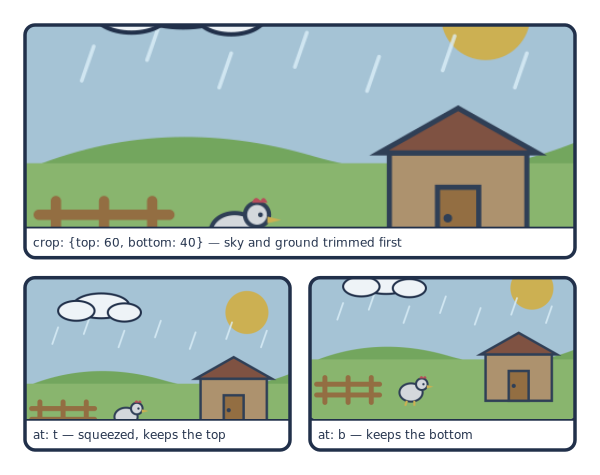
# `height: auto` rows take their height from the image (after `crop:`) plus
# the caption band. Too tall for the page together, so the art is squeezed and
# `fit: cover` crops the rest — `at:` picks which edge survives.
page: [120, 95]
px_per_mm: 5
margin_mm: 5
gutter_mm: 4
library: "../../examples/pes/characters"
caption_style: {font_size: 12}

rows:
  - height: auto
    panels:
      - caption: "crop: {top: 60, bottom: 40} — sky and ground trimmed first"
        image: {src: "raster-art/backdrop.png", crop: {top: 60, bottom: 40}}

  - height: auto
    panels:
      - caption: "at: t — squeezed, keeps the top"
        image: {src: "raster-art/backdrop.png", at: t}
      - caption: "at: b — keeps the bottom"
        image: {src: "raster-art/backdrop.png", at: b}
If the auto rows do not fit the page, their art is scaled down by one
common factor until they do; caption bands never shrink, so the text stays
legible and the numbers add up. fit: cover then crops the excess from every
squeezed picture — from the edge the image's at: does not name, centred by
default. Squeezing crops a little off each picture; when one picture has empty
space to spare, trimming it with crop: first means the others lose less.
Fixed (height_mm) rows are measured out before the auto rows; weighted rows
share whatever the auto rows leave, which may be nothing. A height: auto row
needs at least one panel with an image: to measure.
To paginate a long story, ask how hard a candidate page squeezes before you add another row to it:
from comicforge import page_squeeze
page_squeeze(spec)   # 1.0 = fits as is; 0.9 = every picture loses 10% of its height
A generator can then keep adding rows while the squeeze stays above whatever it tolerates, and start a new page when it would not.
Panels
Inside a row, width works exactly like height does for rows — a relative
weight sharing the row's width after gutters.
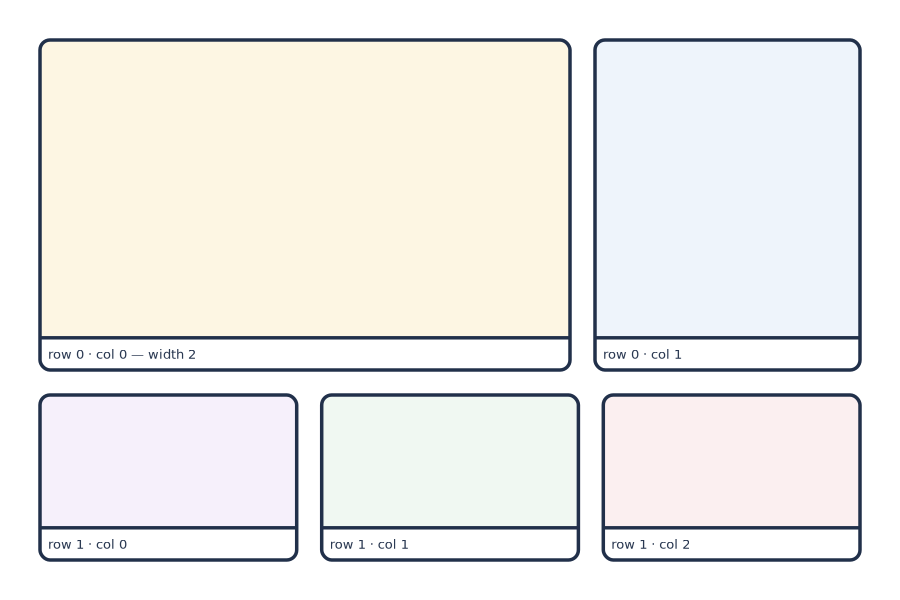
# Rows stack down the page; panels run left to right inside a row.
# `height` and `width` are relative weights, not units.
page: [180, 120]
px_per_mm: 5
margin_mm: 8
gutter_mm: 5
library: "../../examples/pes/characters"

rows:
  - height: 2                       # this row gets 2/3 of the usable height
    panels:
      - width: 2                    # …and 2/3 of the row's width
        bg: "#fdf6e3"
        caption: "row 0 · col 0 — width 2"
      - bg: "#eef4fb"
        caption: "row 0 · col 1"
  - height: 1                       # …the remaining 1/3
    panels:
      - bg: "#f6f0fb"
        caption: "row 1 · col 0"
      - bg: "#f0f8f2"
        caption: "row 1 · col 1"
      - bg: "#fbeff0"
        caption: "row 1 · col 2"
The first row's panels are weighted 2 and 1, so they take two thirds and one
third of the width. The second row's three panels have no width at all, so
they are equal. Vertically, the first row's height: 2 against the second's
height: 1 splits the grid two-to-one.
Panel keys
| Key | Meaning |
|---|---|
width |
Relative width weight inside the row (default 1) |
bg |
Flat background colour (default #fbfaf6, a warm off-white) |
frame |
Outline override for this panel — see Captions and frames |
caption |
Narration band under the art, inside the frame |
scene |
A scene background |
image |
A raster background |
actors |
Characters placed in the panel |
pixel |
Pixel-art sprites |
bubbles |
Speech, thought and shout bubbles |
Any other key in a panel is a typo, and
cmf validate says so. The renderer will not —
it ignores what it does not recognise, so imge: costs you a background and no
error message.
Panel contents are fractional
Every coordinate inside a panel is a fraction of that panel: x from left to
right, y from top to bottom, and scale as a fraction of the panel's height.
That means panel contents survive layout changes. Re-weight a row, switch from A4 to a landscape strip, add a caption band that shrinks the art box — the figures stay in the same relative composition. Nothing has to be recomputed.
Looking at one panel
Once a page is full, re-rendering all of it to check one corner is a waste. Render the panel instead:
cmf panel pages/strip.yaml --row 0 --col 1        # 0-indexed, row then column
cmf panel pages/strip.yaml --all -o panels/       # every panel into a directory
cmf panel pages/strip.yaml --row 1 --col 0 --scale 1.0
cmf panel pages/strip.yaml --row 1 --col 0 --on-page  # exactly as on the page

cmf panel examples/pes/pages/kosticka.yaml --row 0 --col 1--scale defaults to 0.5, which is deliberately low-resolution: the point is
a quick look, not a final render. This is the right way to inspect one panel —
rendering the whole page and cropping it with an image tool gives you the same
picture for much more work.
On its own canvas a panel loses the outer half of its frame stroke and its
rounded corners go transparent. When you need it to look exactly as it does
on the page, add --on-page: the panel is cropped out of the page render with
half a gutter around it.
--all also writes a layout.json with every panel's position on the page, and
--layout prints the same JSON without rendering — enough to lay the panel
images out again, say in an HTML preview. See panel.
Output formats
The extension decides the format:
cmf render pages/strip.yaml -o strip.png    # raster at px_per_mm
cmf render pages/strip.yaml -o strip.pdf    # true vector
cmf render pages/strip.yaml -o strip.svg    # the composed document
Omit -o entirely and the render lands in output/ with a timestamp, so
successive attempts accumulate side by side.