Core concepts
Five ideas carry the whole engine. Once these are clear, the rest of the documentation is a list of key names.
1. A content-free engine
The comicforge package is code and nothing but code. It has no default
characters, no bundled backgrounds, no fallback sprite. There is no shared asset
library anywhere — every project owns all of its own art.
comicforge/          the engine — loads assets, composes SVG, writes output
my-comic/            a project — characters, scenes, sprites, page specs
This is why every asset directory has to be named explicitly, either in the spec or on the command line. A missing one is an error with a sentence telling you which key to set, never a silent fallback to something built in.
The upshot is that upgrading the engine can never change how your comic looks by swapping art underneath you, and two projects on one machine can not collide.
2. A page is a declarative spec
There is no drawing API and no imperative sequence of calls. A page is a YAML document that names its assets and describes its layout:
library: "../characters"
rows:
  - panels:
      - actors:  [{char: tom, face: happy, x: 0.4, y: 0.7, scale: 0.8}]
        bubbles: [{text: "Ahoj!", kind: speech, speaker: tom}]
Because the whole authoring surface is data, the same file can be hand-written, templated, generated by a script, diffed in a pull request, or produced by a language model — and it renders identically in every case.
The companion to the spec is the manifest: cmf characters and cmf scenes
print JSON describing exactly what art exists, which slots it has, and what the
legal variants are. Spec plus manifest is the entire contract.
3. Posing is stacking overlays
A character is not a rig. It is a base SVG plus overlay SVGs, all drawn
in the same viewBox, stacked in order:
An overlay belongs to a slot (face, arms, …) and is one variant of
that slot. Writing face: happy in a spec selects a file. There is no
interpolation, no skeleton, and no maths you have to get right — which means
every expression is a small hand-editable drawing, and a wrong-looking pose is
fixed by editing a shape rather than by tuning a parameter.
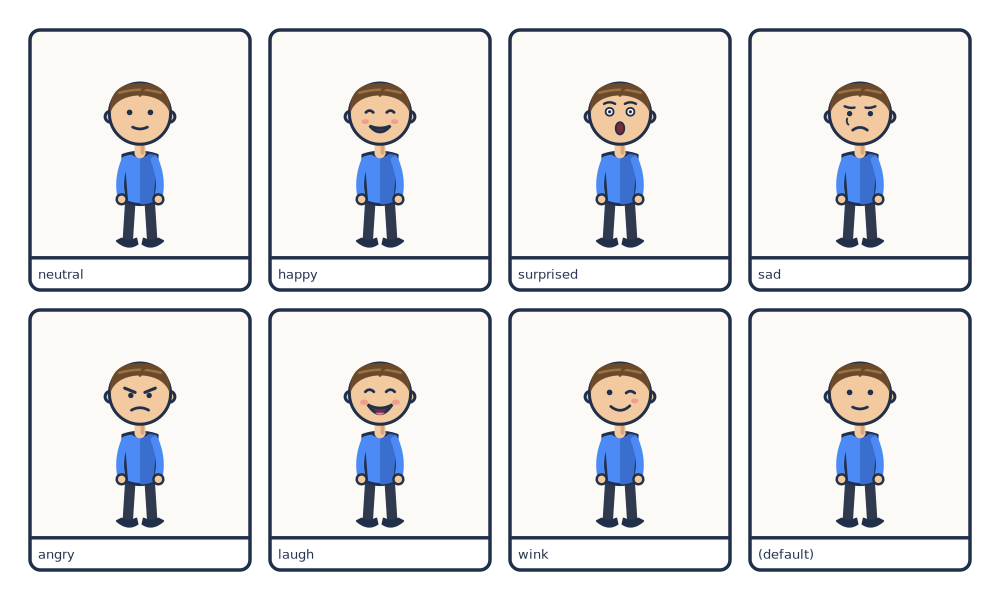
face slot — the last panel omits face: entirely and gets the manifest's default.A character that needs more than one body — sitting versus walking — owns several poses, each with its own base. Shared overlays are drawn once and re-registered onto each pose through an anchor point. See Making the art › Characters for the mechanics.
4. Everything is placed by fraction
No coordinate in a spec is a pixel or a millimetre. Positions are fractions of the panel that contains them:
xruns0(left edge) →1(right edge)yruns0(top edge) →1(bottom edge)scale, for an actor or a sprite, is its height as a fraction of the panel height
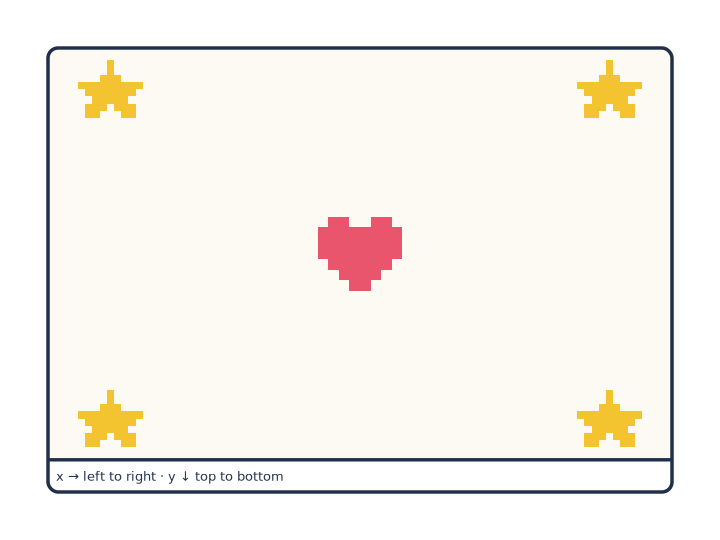
The point of fractions is that a panel can change size — a different page format, a re-weighted row, a caption band appearing underneath — without invalidating a single number you wrote. Composition survives layout changes.
The one place this does not apply is page:, which is in millimetres, because
paper is.
5. SVG all the way down
Every stage composes SVG. Characters, scenes, bubbles, captions, sprites and frames are all markup; the page is one SVG document; rasterization happens once, at the very end, and only if you asked for a raster.
| Extension | What you get |
|---|---|
.svg |
The composed document itself. Raster backgrounds are embedded as data URIs, so it stays self-contained when moved. |
.pdf |
True vector. Crisp at any print size. px_per_mm is irrelevant to it. |
.png |
Rasterized at px_per_mm — the one output where that key matters. |
How the pieces fit
                       ┌─────────────────┐
   characters/  ─────► │                 │
   scenes/      ─────► │  spec (YAML)    │ ──► composed SVG ──► .svg
   pixel/       ─────► │  rows > panels  │                  ├─► .pdf  (vector)
   images       ─────► │                 │                  └─► .png  (px_per_mm)
                       └─────────────────┘
Within a panel, things are drawn back to front in a fixed order:
- the panel background colour (
bg, cream#fbfaf6by default) - the
caption:band, if any - a raster
image:, if any - a
scene:background, if any pixel:spritesactors:, in the order they are listedbubbles:- the
frame:outline, last and on top of everything
So a later actor in the list covers an earlier one, and bubbles are always on top of the figures. Everything except the frame is clipped to the panel's rounded rectangle — including the caption band, which is painted early enough that an actor placed low can overlap it.
Vocabulary
| Term | Means |
|---|---|
| project | A directory owning characters/, scenes/, pixel/ and its page specs. |
| spec | One YAML file describing one page or one standalone illustration. |
| character | An identity — a name, a label, and one or more poses. |
| pose | One body of a character, drawn in its own viewBox. |
| slot | A dimension of variation on a character or scene — face, arms, weather. |
| variant | One value of a slot, backed by one overlay SVG. |
| anchor | The reference point a shared overlay is drawn around, so it can re-register onto every pose. |
| actor | One placement of a character inside a panel. |
| scene | A reusable illustrated background, cover-scaled into a panel. |
| manifest | The JSON printed by cmf characters / cmf scenes — the machine-readable list of what exists. |