Actors
An actor is one placement of a character inside a panel. The character is the art; the actor is where it stands, how big it is, which way it faces, and which variant of each slot it wears.
actors:
  - char: tom        # which character (required)
    pose: walk       # which body — optional, defaults to the character's default
    face: happy      # one key per slot, naming a variant
    arms: wave
    x: 0.35          # centre, as a fraction of the panel width
    y: 0.62          # centre, as a fraction of the panel height
    scale: 0.85      # height, as a fraction of the panel height
    flip: false      # mirror horizontally
Actors are drawn in list order, so a later one covers an earlier one. Put the figure that should be in front last.
Slots and variants
A character declares its slots and the variants of each. Naming a slot in an actor picks a variant of it; leaving it out uses the character's default.
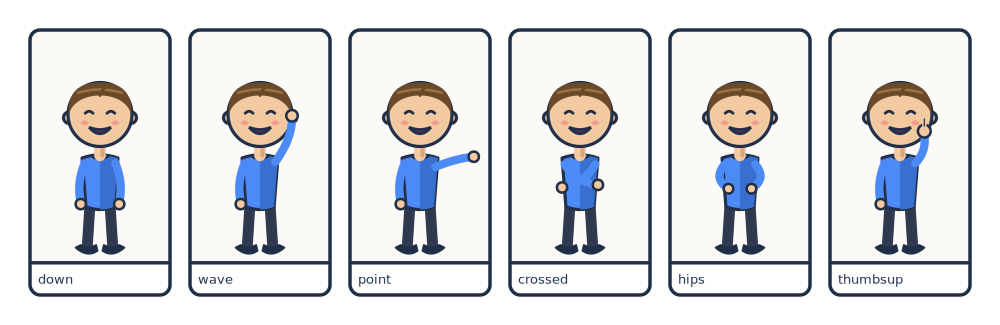
arms varies across these panels while face: happy holds still.# Slots are independent: `arms` varies while `face` stays put.
page: [200, 65]
px_per_mm: 5
margin_mm: 6
gutter_mm: 4
library: "../../examples/pes/characters"
rows:
- panels:
- {caption: down, actors: [{char: tom, arms: down, face: happy, x: 0.5, y: 0.55, scale: 0.88}]}
- {caption: wave, actors: [{char: tom, arms: wave, face: happy, x: 0.5, y: 0.55, scale: 0.88}]}
- {caption: point, actors: [{char: tom, arms: point, face: happy, x: 0.5, y: 0.55, scale: 0.88}]}
- {caption: crossed, actors: [{char: tom, arms: crossed, face: happy, x: 0.5, y: 0.55, scale: 0.88}]}
- {caption: hips, actors: [{char: tom, arms: hips, face: happy, x: 0.5, y: 0.55, scale: 0.88}]}
- {caption: thumbsup, actors: [{char: tom, arms: thumbsup, face: happy, x: 0.5, y: 0.55, scale: 0.88}]}
Never guess a variant name. Ask the library what exists:
{
  "tom": {
    "label": "Tom",
    "slots": {
      "arms": ["down", "wave", "point", "crossed", "hips", "thumbsup"],
      "face": ["neutral", "happy", "surprised", "sad", "angry", "laugh", "wink"]
    },
    "default": {"face": "neutral", "arms": "down"}
  }
}
A variant that does not exist is caught by
cmf validate with the legal values listed. So
is a mistyped slot name — which matters, because render silently ignores keys
it does not recognise, and fcae: happy renders a perfectly happy-looking
default face.
Poses
A character with more than one body owns several poses, each drawn in its
own viewBox. Pick one with pose:; omit it and you get the default pose from
the manifest.
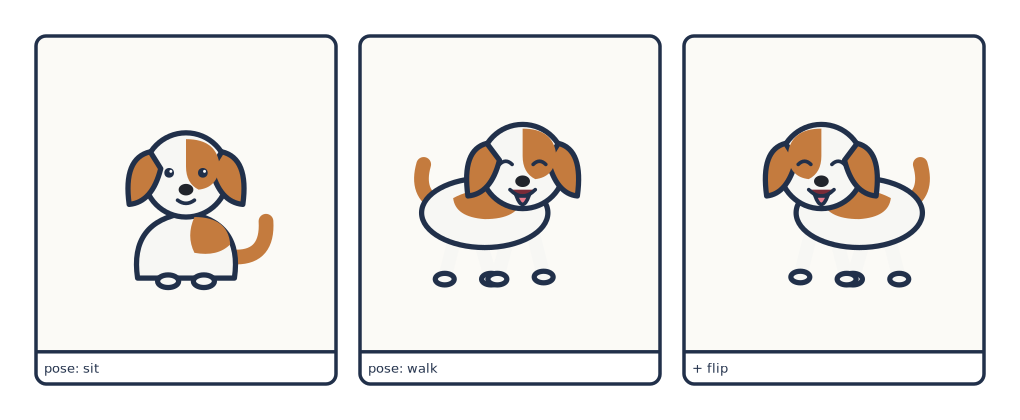
# Bára is a *posed* character: two bodies, one shared set of faces.
page: [170, 70]
px_per_mm: 6
margin_mm: 6
gutter_mm: 4
library: "../../examples/pes/characters"

rows:
  - panels:
      - {caption: "pose: sit",  actors: [{char: bara, pose: sit,  face: neutral, x: 0.5, y: 0.5, scale: 0.6}]}
      - {caption: "pose: walk", actors: [{char: bara, pose: walk, face: happy,   x: 0.5, y: 0.5, scale: 0.6}]}
      - {caption: "+ flip",     actors: [{char: bara, pose: walk, face: happy,   x: 0.5, y: 0.5, scale: 0.6, flip: true}]}
Expressions are shared across poses wherever the character was authored that
way — face: happy is one file that re-registers onto every body through the
character's anchor. Some slots are shared and some belong to a single pose;
the manifest shows both, listing shared slots at the top level and pose-specific
ones under each pose.
{
  "bara": {
    "label": "Bára",
    "slots": {"face": ["neutral", "happy"]},
    "default": {"pose": "sit", "face": "neutral"},
    "default_pose": "sit",
    "poses": {"sit": {"slots": {}, "default": {}},
              "walk": {"slots": {}, "default": {}}}
  }
}
How that is built is covered in Making the art › Characters.
Placement
| Key | Default | Meaning |
|---|---|---|
x |
0.5 |
Horizontal centre, fraction of panel width |
y |
0.6 |
Vertical centre, fraction of panel height |
scale |
0.8 |
Height, as a fraction of panel height |
flip |
false |
Mirror horizontally |
x and y position the actor's centre, and scale sets its height — the
width follows from the pose's aspect ratio. A wide pose at scale: 0.9 can
therefore be wider than the panel even though it fits vertically; the panel
clips it.
The defaults are chosen for a figure standing in a panel: centred, slightly
below the middle, most of the panel tall. {char: tom} on its own is a legal
actor.
Feet in the caption band
A caption: shrinks the art box, and coordinates are relative to the art
box — but the band is painted before the figures, so an actor low enough
still draws over it. If legs land on your narration, raise y or drop
scale a little.
Facing each other
Two characters in conversation usually need to face inward. Draw them once,
facing one way, and flip the other:
actors:
  - {char: tom,  face: happy, arms: point, x: 0.30, y: 0.66, scale: 0.8}
  - {char: tom,  face: surprised, x: 0.70, y: 0.66, scale: 0.8, flip: true}
flip mirrors the whole composed character — base and every overlay together —
so nothing comes apart.
Checking one character
To look at a pose or an expression without building a page around it:
cmf character bara sit happy --library characters
cmf character bara pose=walk face=neutral --library characters
cmf character tom --library characters          # defaults for everything
Each argument after the name is either a bare variant or pose name, or an
explicit key=value. Bare names are matched against poses first, then against
the variants of every slot; an unknown one errors with the available names
listed.
It writes two files: the full render, and a smaller <name>.small.png beside
it. When an agent is reading the result back, the small one costs far fewer
tokens.