Pixel art
A sprite is a grid of characters and a palette that maps each character to a colour. It is the cheapest way to get a prop, an icon or an emotive symbol into a panel — a heart, a bone, a star over someone's head — without opening a vector editor.
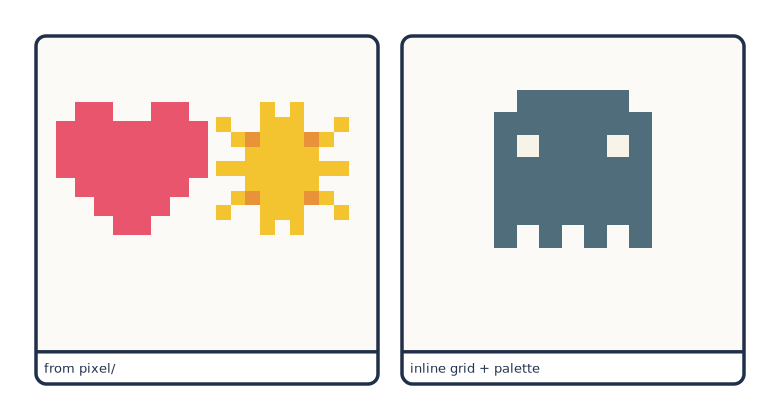
# Sprites from the project's pixel/ dir, or written inline in the spec.
page: [130, 70]
px_per_mm: 6
margin_mm: 6
gutter_mm: 4
library:   "../../examples/pes/characters"
pixel_dir: "../../examples/pes/pixel"

rows:
  - panels:
      - caption: "from pixel/"
        pixel:
          - {art: heart, x: 0.28, y: 0.42, scale: 0.42}
          - {art: sun,   x: 0.72, y: 0.42, scale: 0.42}
      - caption: "inline grid + palette"
        pixel:
          - grid:
              - ".XXXXX."
              - "XXXXXXX"
              - "XoXXXoX"
              - "XXXXXXX"
              - "XXXXXXX"
              - "XXXXXXX"
              - "X.X.X.X"
            palette: {X: "#4f6d7a", o: "#f7f3e8"}
            x: 0.5
            y: 0.42
            scale: 0.5
Sprites are drawn after the background and before the actors, so a figure placed over one covers it.
The two forms
From the library
pixel_dir: "../pixel"      # needed for `art:` references

pixel:
  - {art: heart, x: 0.8, y: 0.25, scale: 0.18}
Library sprites live one file per sprite at <project>/pixel/<name>.yaml:
# A starter pixel-art sprite. Reference it from a spec as {art: heart, ...}.
palette:
  r: "#e8554d"
grid:
  - ".rr.rr."
  - "rrrrrrr"
  - "rrrrrrr"
  - ".rrrrr."
  - "..rrr.."
  - "...r..."
Ask a project what it has the same way you ask about characters — the file names are the sprite names:
A name that is not there fails with the available list, and cmf validate
catches it before you render.
Inline
Inline sprites need no pixel_dir: at all. Use them for something that appears
once; promote it to a file the second time you need it.
Writing a grid
gridis a list of strings, one per row. Rows should be the same length — the sprite's width is taken from the longest..and a space are transparent. Every other character is looked up inpalette; a character with no entry falls back to black.- Palette keys are case-sensitive, which gives you cheap shading:
Rfor the body colour andrfor its shadow.
palette:
  R: "#e8556d"     # highlight
  r: "#b83e54"     # shadow
grid:
  - ".RR..RR."
  - "RRRRRRRR"
  - "RrrrrrrR"
  - ".RRRRRR."
  - "..RRRR.."
  - "...RR..."
Sprites are rendered with shape-rendering="crispEdges", so the cells stay hard
at any scale — no blurring in a PNG, no seams in a PDF.
Placement
| Key | Default | Meaning |
|---|---|---|
x |
0.5 |
Horizontal centre, fraction of panel width |
y |
0.5 |
Vertical centre, fraction of panel height |
scale |
0.2 |
Height, as a fraction of panel height |
Width follows from the grid's aspect ratio, so a wide sprite at scale: 0.2 is
wider than a square one. A panel can hold as many sprites as you like; they are
drawn in list order.
What they are good for
Pixel sprites are deliberately crude, which is exactly why they read as symbols rather than as objects in the scene:
# emotional punctuation over a character's head
pixel: [{art: heart, x: 0.72, y: 0.22, scale: 0.16}]

# a prop the story is about
pixel: [{art: bone,  x: 0.2,  y: 0.6,  scale: 0.18}]

# weather or time of day, cheaply
pixel: [{art: sun,   x: 0.85, y: 0.15, scale: 0.2}]
For anything that needs to be drawn rather than indicated, use a scene overlay or a character slot instead.