Making a scene
A scene is a character without poses: base.svg, optional overlay variants, and
a manifest. Same shape, same rules, different filename.
scenes/<name>/
  base.svg                 the full background, drawn in its own viewBox
  <slot>-<variant>.svg     optional overlays in the SAME viewBox
  scene.yaml               the manifest
name: dvur
label: Dvůr
viewbox: [320, 200]
default:
  weather: clear
slots:
  weather: [clear, rain]
A scene with nothing to vary needs only name, label and viewbox.
Drawing the base
The base is the whole background — sky, ground, buildings, props. There is no layering system beyond the overlays, so everything permanent belongs here.
<svg xmlns="http://www.w3.org/2000/svg" viewBox="0 0 320 200" width="320" height="200">
  <!-- sky -->
  <rect x="0" y="0" width="320" height="132" fill="#bfe2f5"/>
  <circle cx="268" cy="42" r="26" fill="#f4c945"/>
  <!-- rolling hills -->
  <path d="M0 132 Q80 98 168 124 Q244 146 320 116 L320 132 Z" fill="#7cbb55"/>
  <!-- ground -->
  <rect x="0" y="128" width="320" height="72" fill="#9ad06a"/>
  …
</svg>
Compose for cropping
A scene is cover-scaled: enlarged until it fills the panel in both directions, centred, with the overflow clipped. Which dimension gets cut depends entirely on the panel's aspect ratio, and the same scene will be used in wide panels and tall ones.
So:
- Keep what matters near the centre. The edges are the first thing to go.
- Give the composition slack on all four sides — a horizon that only just reaches the corner will not reach it in a taller panel.
- Do not draw a border or a frame into the background. Panel outlines are the spec's job, and a drawn one gets cropped asymmetrically.
A viewBox somewhere near the aspect ratio of a typical panel keeps the cropping mild. Square-ish (320 × 200 in the demo) survives both orientations well.
Overlays
Each overlay is one variant of one slot, drawn in the base's viewBox, and drawn over the base. They are for what changes between beats of the story:
<svg xmlns="http://www.w3.org/2000/svg" viewBox="0 0 320 200" width="320" height="200">
  <rect x="0" y="0" width="320" height="200" fill="#5a6b7a" opacity="0.26"/>
  <g stroke="#dff1fb" stroke-width="2.2" stroke-linecap="round" opacity="0.75">
    <path d="M40 60 L33 80"/>
    …
  </g>
</svg>
Two techniques do most of the work:
- A translucent wash over the whole viewBox changes the light of the entire scene in one rectangle — rain, dusk, a heat haze.
- Additive detail puts something in the scene that was not there before — drops, snow, a parked bicycle, an open door.
There is no way for an overlay to remove part of the base. Anything that
sometimes disappears has to be an overlay itself, with an empty or alternative
variant taking its place. A clear variant that draws nothing but a
one-line comment is a perfectly good file.
Using it
Confirm what the engine sees:
{
  "dvur": {"label": "Dvůr", "slots": {"weather": ["clear", "rain"]},
           "default": {"weather": "clear"}},
  "pokoj": {"label": "Pokoj", "slots": {}, "default": {}}
}
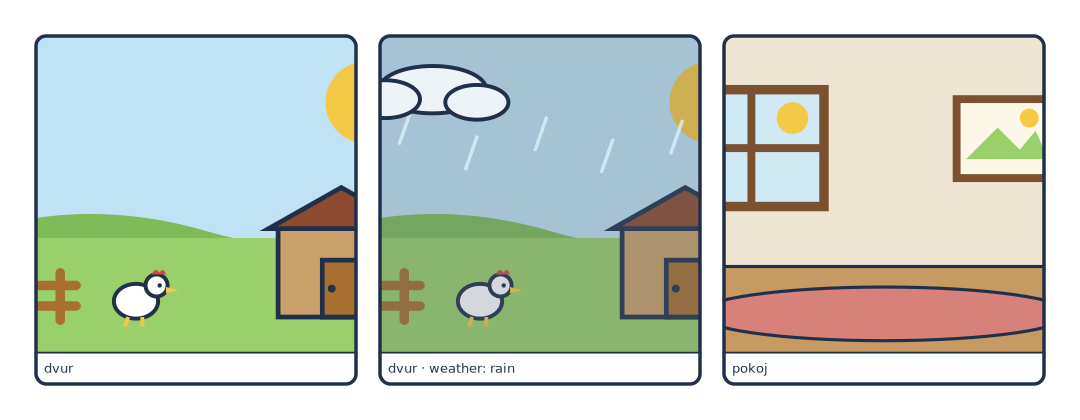
Checking a scene on its own
The quickest way to look at a background at full size is a standalone illustration with nothing on it:
type: scene
scenes_dir: "../scenes"
library: "../characters"
scene: {name: dvur, weather: rain}
scale: 3
library: is required even when no actors appear — it can point at an empty
directory.
Failure modes
| Symptom | Cause |
|---|---|
scene 'x' not found in … |
Directory name mismatch, or no scene.yaml in it |
| Overlay drifts relative to the base | Its viewBox differs from the base's |
| The interesting part is cropped away | Composition too close to the edge for the panel's aspect ratio |
| Panel edges show background colour | Impossible with cover — you are looking at fit: contain on a raster image: instead |