Making a character
A character is a directory of SVG files and one manifest. No code, no build
step, no registration anywhere in the engine — drop the directory into
characters/ and it exists.
There are two on-disk shapes. Use the simple one until you need more than one body.
Single-pose (flat)
Everything drawn in one viewBox:
characters/<name>/
  base.svg                 the body
  <slot>-<variant>.svg     overlays, in the SAME viewBox
  character.yaml           the manifest
name: tom                  # internal id — must match the directory name
label: Tom                 # display name, used in the manifest
viewbox: [200, 320]        # the shared local canvas [width, height]
default:
  face: neutral            # used whenever a spec omits the slot
  arms: down
slots:
  arms: [down, wave, point, crossed, hips, thumbsup]
  face: [neutral, happy, surprised, sad, angry, laugh, wink]
Every file — base and overlays alike — declares the same viewBox. That is the
whole registration mechanism: the engine strips each SVG to its inner markup and
stacks them in one coordinate system, so a mouth drawn at (100, 92) lands at
(100, 92) on the body.
The stacking order is the slot order in character.yaml, so a slot listed later
draws over one listed earlier. Put face after arms if a raised hand should
never cover the mouth.
Drawing rules that matter
- One
viewBox, no exceptions. An overlay with a different viewBox will be scaled to the pose's and land in the wrong place. - Draw only the part that varies.
face-happy.svgcontains eyes and a mouth, not a head. The head is inbase.svg, and drawing it twice means one outline peeking out from behind the other. - Leave the head alone across expressions. Same size, same position — the variation is in the features.
- Name files
<slot>-<variant>.svg. The file name is the lookup; a slot listed in the manifest with no matching file fails at load time.
Here is a complete, minimal character — the one from Your first comic:
<svg xmlns="http://www.w3.org/2000/svg" viewBox="0 0 200 260">
  <g stroke="#21304a" stroke-width="6" stroke-linecap="round">
    <!-- legs -->
    <path d="M85 200v40M115 200v40" fill="none"/>
    <!-- body -->
    <rect x="62" y="118" width="76" height="86" rx="26" fill="#6aa9e0"/>
    <!-- arms -->
    <path d="M64 140l-26 30M136 140l26 30" fill="none"/>
    <!-- head -->
    <circle cx="100" cy="74" r="46" fill="#f6d3ad"/>
  </g>
</svg>
Multiple poses
When the body changes — sitting versus walking, legs in a different place — one viewBox is no longer enough. Give each pose its own base, and let the expressions stay shared.
characters/<name>/
  character.yaml           identity + SHARED slots + default + the pose list
  <slot>-<variant>.svg     SHARED overlays, drawn around the canonical anchor
  poses/
    sit/
      pose.yaml            viewbox, anchor, optional pose-specific slots
      base.svg             this pose's body
    walk/
      pose.yaml
      base.svg
      <slot>-<variant>.svg optional overlays that only exist in this pose
name: bara
label: Bára
anchor: [120, 72]                 # the canonical point shared overlays draw around
slots:  {face: [neutral, happy]}  # SHARED across poses
default: {pose: sit, face: neutral}
poses: [sit, walk]
viewbox: [240, 180]
anchor: [132, 64]                 # where THIS pose's head centre lands
slots:  {arms: [trot]}            # optional, pose-specific
default: {arms: trot}
The anchor
The anchor is the trick that makes one face file work on every body. It is a reference point — the head centre is the natural choice — that you agree on once:
- The character's
anchoris where the head centre sits in the coordinate system the shared overlays are drawn in. - Each pose's
anchoris where that same head centre sits in that pose's viewBox.
When composing, the engine shifts every shared overlay by
pose.anchor − character.anchor. So face-happy.svg, authored once, lands
correctly whether Bára is sitting or walking.
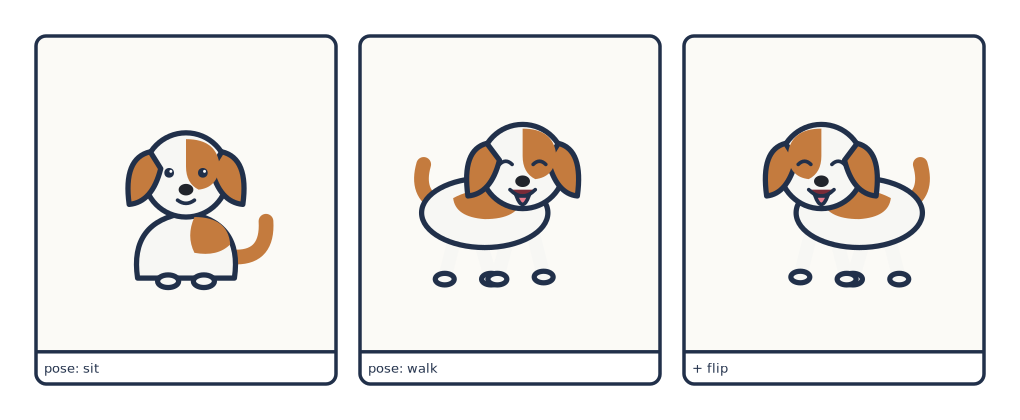
happy face in the middle and right panels is the same file as the one drawn for sit.Translate only
The shift is a translation and nothing else — no scaling, no rotation. Keep the head the same size across every pose and move only its position. A pose that draws a bigger head will wear a face that is too small for it.
Composition order
For one actor, the engine assembles:
- the chosen pose's
base.svg - that pose's pose-specific overlays, in
pose.yamlslot order - the shared overlays, in
character.yamlslot order, each wrapped in the anchor translate
Then the whole thing is scaled to the requested height and centred at the requested point.
Flat is a special case of posed
A flat character is the posed model with one implicit pose whose anchor is
[0, 0] and whose viewBox is the character's. Both render through exactly the
same code path, which is why adding poses to an existing flat character later is
a restructuring rather than a rewrite.
Adding to an existing character
| You want | Do this |
|---|---|
| A new shared expression | Draw it around the canonical anchor, save as <slot>-<variant>.svg at the character root, add the variant to slots in character.yaml |
| A new pose | Add poses/<name>/ with its own base.svg and pose.yaml (set its anchor), and list the name under poses: |
| A new overlay on a flat character | Save <slot>-<variant>.svg in the shared viewBox, add it to slots |
| A whole new slot | Add the slot to slots, add a variant file for each value, and give it an entry in default |
No code changes in any case.
Checking your work
cmf characters --library characters        # what does the engine think exists?
cmf character bara walk happy --library characters
cmf character tom --library characters     # everything at its default
cmf character renders one character alone on a plain canvas, cropped to its
pose — the fastest way to see whether an overlay lines up. It writes the full
render plus a smaller <name>.small.png companion; when an agent is reading the
result back, the small one costs far fewer tokens.
Common failures and what they mean:
| Symptom | Cause |
|---|---|
is not a well-formed <svg>…</svg> file |
The overlay is missing its outer <svg> element |
| Overlay lands in the wrong place | Its viewBox differs from the base's, or the pose anchor is wrong |
slot 'face' has no variant 'grin' |
The variant is not listed in the manifest — or the file name does not match |
| A double outline around the head | The overlay redraws part of the base |
| The face is too small on one pose | That pose draws the head at a different size — anchors translate, they do not scale |
Where the art comes from
The demo art in examples/pes/ is hand- and LLM-authored SVG, edited directly.
There is no procedural generator, and there is no vectorizer in the pipeline.
A visual model is genuinely useful for inspiration — generate a reference
image, then author the crisp SVG from it. cmf inspire does that
part. What you must not do is auto-vectorize the result: tracing produces
thousands of paths in one flat layer, which destroys the slot structure and the
anchor registration that make the character poseable at all.