Captions and frames
Two panel-level touches that do most of the work of making a page look like a comic rather than a grid of pictures: the narrator's voice, and the line around the art.
Captions
A caption is narration — the storyteller, not a character. It is drawn as a flat band along the bottom of the panel, inside the frame, separated from the art by a hairline in the frame colour.
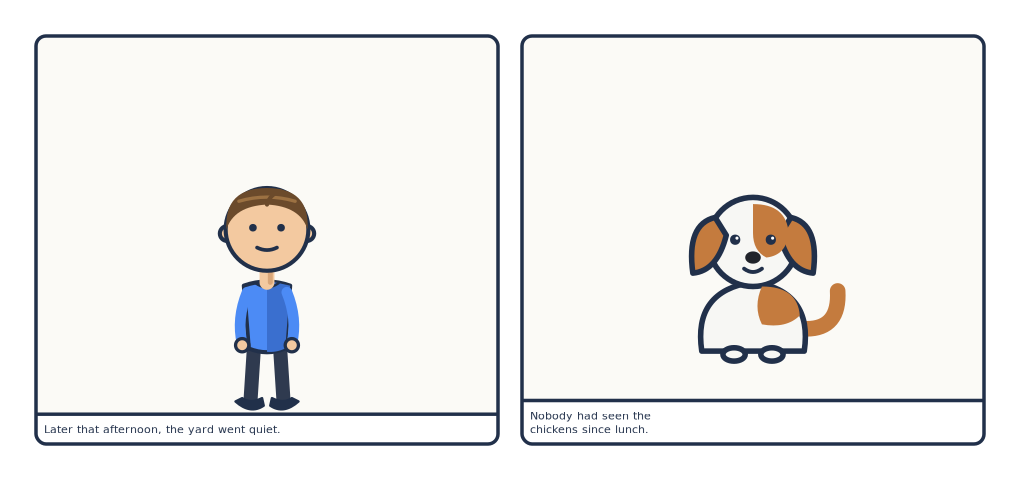
# A caption is narration: a band under the art, inside the frame. The art box
# shrinks to make room, so actor and bubble coordinates stay picture-relative.
page: [170, 80]
px_per_mm: 6
margin_mm: 6
gutter_mm: 4
library: "../../examples/pes/characters"
caption_style:
  font_size: 11
  align: left
  max_chars: 42

rows:
  - panels:
      - caption: "Later that afternoon, the yard went quiet."
        actors: [{char: tom, face: neutral, x: 0.5, y: 0.66, scale: 0.7}]
      - caption: {text: "Nobody had seen the chickens since lunch.", max_chars: 26}
        actors: [{char: bara, pose: sit, x: 0.5, y: 0.62, scale: 0.55}]
caption: "Later that afternoon, the yard went quiet."
caption: {text: "Nobody had seen the chickens since lunch.", max_chars: 26}
The art box shrinks
This is the part worth internalising: the band takes its height off the
picture, not out of it. The art box becomes shorter, and every panel fraction
inside — actor x/y/scale, bubble placement, sprite positions — stays
relative to the picture.
So adding a caption to a finished panel does not move the composition around; it squeezes it slightly. Nothing needs re-tuning.
The band's height depends on how many lines the text wraps to, which depends on
max_chars and font_size. To size a row around one, ask:
from comicforge import caption
caption.height("Later that afternoon, the yard went quiet.", {"font_size": 13})
caption.height("…", {"max_chars": "auto"}, width=744)  # auto wrap needs the panel width
Or don't: a height: auto row adds
the band for you.
Wrapping to the width
max_chars: auto wraps to the band's width instead of a character count — the
text is measured with the same estimate bubbles use, so a caption fills the
panel it sits in whether the panel is a third of the page or all of it. The
estimate is tuned for DejaVu Sans; for a narrower font set em below 1
(0.9 means "this font is a tenth narrower"), for a wider one above.
Line breaks
Wrapping breaks between words, with two exceptions.
A one-letter word never ends a line. Czech typography does not leave a
one-letter preposition or conjunction (k s v z o u a i) hanging at the end of
a line, so the wrap ties it to the word after it:
… putovaly jesle, seno, vůl        … putovaly jesle, seno, vůl i
i osel. Osel měl vlastní názor.    osel. Osel měl vlastní názor.
  ^ default                          ^ glue_singles: false
A no-break space is never broken at. Type a U+00A0 (or U+202F) in the
text and the words around it stay on one line — use it for the ties the
automatic rule cannot know about, such as 1223 in v roce 1223 or a name
and its title.
Both apply to bubbles and captions alike, and both are switched off per page or
per line with glue_singles: false:
Actors draw over the band
The band is painted early, before the figures, so an actor placed low enough
still covers it. If feet land on your narration, raise the actor's y or
reduce scale.
caption_style
Set page-wide at the top level; a panel's caption: {…} mapping can override
text and max_chars per panel.
| Key | Default | Meaning |
|---|---|---|
font |
DejaVu Sans stack | Font family |
font_size |
13 |
Text size in px |
ink |
#21304a |
Text colour |
bg |
#ffffff |
Band colour |
pad |
8 |
Text inset from the band edge |
max_chars |
60 |
Wrap width in characters, or auto for the band's width |
em |
1.0 |
Width scale of the text measure, for max_chars: auto |
align |
left |
left or center |
rule |
true |
Hairline between art and band |
uppercase |
false |
Render caption text in caps |
The hairline is drawn in the frame's colour at the frame's width, so it stays
consistent with the outline — and disappears along with it when the frame width
is 0.
Frames
frame: is the panel outline. Set it page-wide at the top level; any panel can
override it.
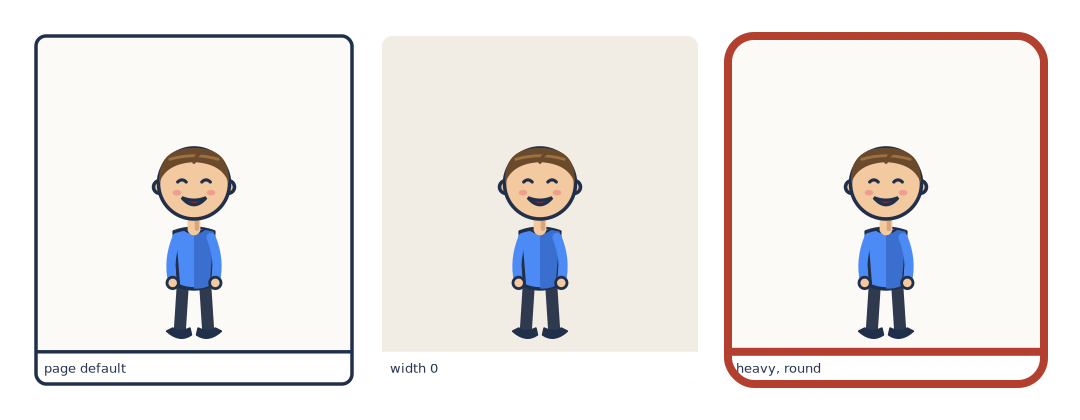
# `frame:` is page-wide; a panel's own `frame:` overrides it. width 0 = no line.
page: [180, 70]
px_per_mm: 6
margin_mm: 6
gutter_mm: 5
library: "../../examples/pes/characters"
frame: {width: 3.5, color: "#21304a", radius: 10}

rows:
  - panels:
      - caption: "page default"
        actors: [{char: tom, face: happy, x: 0.5, y: 0.62, scale: 0.72}]
      - caption: "width 0"
        frame: {width: 0}
        bg: "#f2ede4"
        actors: [{char: tom, face: happy, x: 0.5, y: 0.62, scale: 0.72}]
      - caption: "heavy, round"
        frame: {width: 8, radius: 26, color: "#b3402f"}
        actors: [{char: tom, face: happy, x: 0.5, y: 0.62, scale: 0.72}]
| Key | Default | Meaning |
|---|---|---|
width |
3.5 |
Stroke width in px. 0 draws no outline |
color |
#21304a |
Stroke colour |
radius |
10 |
Corner radius — also clips the art |
Two things follow from radius doubling as a clip:
- Panel contents are cut to the rounded rectangle whether or not the outline is
drawn. Setting
width: 0removes the line but keeps the rounded corners. - For hard corners, set
radius: 0.
The outline is stroked last, over the clipped contents, so it stays crisp: a figure that overflows the panel is cut off cleanly at the line rather than straddling it.
Panel backgrounds
bg on a panel is the flat colour behind everything else. The default is a warm
off-white (#fbfaf6) that reads as paper rather than screen.
Under a full-bleed scene: or image: the background never shows — except with
fit: contain, where it fills the letterbox strips.
Putting it together
A page-wide look, set once at the top:
frame:
  width: 3
  color: "#21304a"
  radius: 8
caption_style:
  font_size: 11
  max_chars: 42
bubble_style:
  font_size: 13
  uppercase: true
…and one panel that breaks out of it: